
The Newbi app is here: your card, leads and bookings on your phone
Newbi is now on the App Store and Google Play. What each tab of the app does, how sharing works, who it is for and how to get started.
By Wesley Sing, Founder of Newbi5 min read
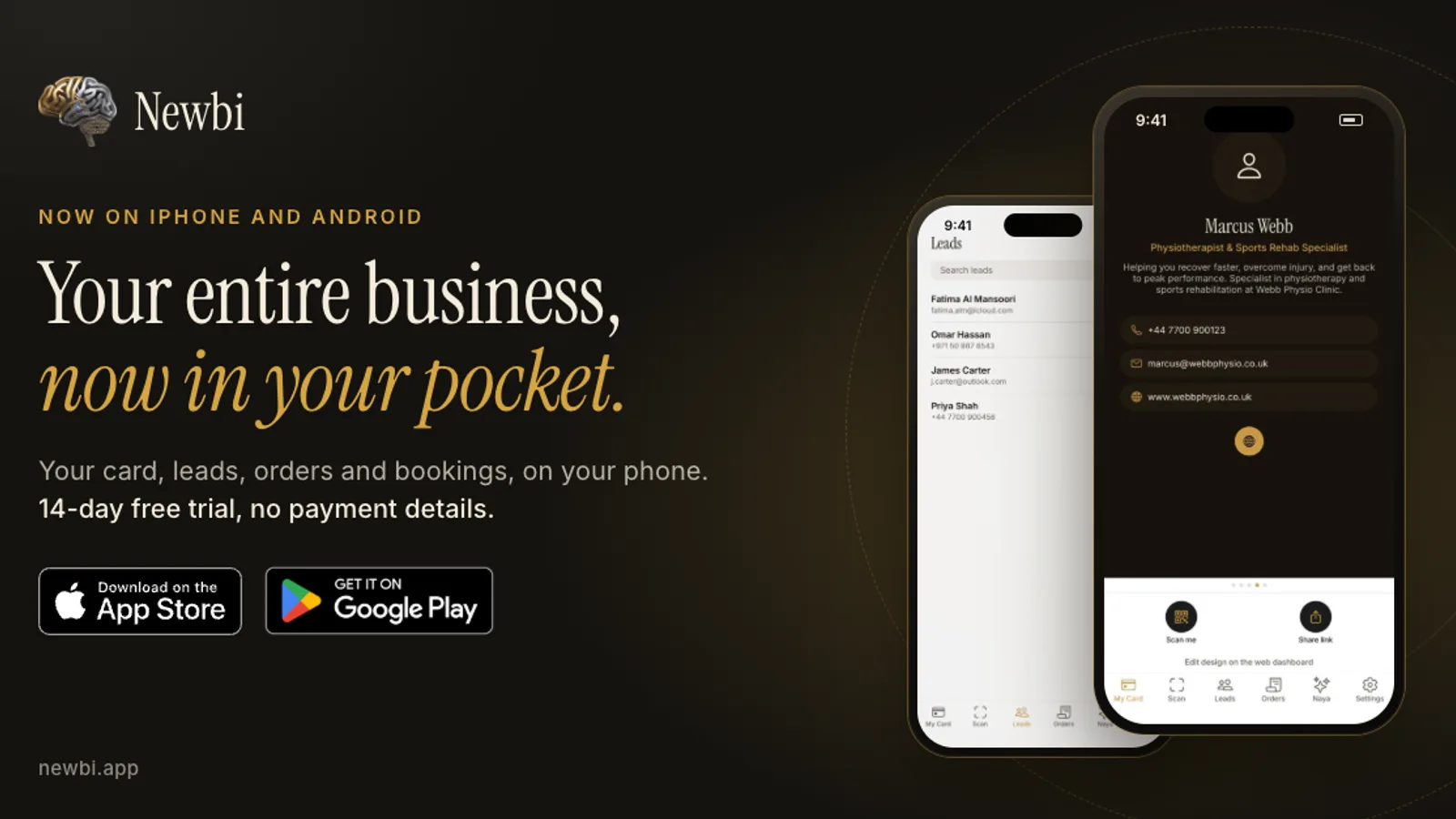
Most business happens away from a desk. You meet someone on a site visit, at a market stall, at a conference or at the school gate, and the conversation either turns into work or ends up in a drawer with the paper card.
Newbi puts a business in one link: a digital business card, mini store, booking page and lead capture, shared by QR code, NFC tap or Apple and Google Wallet pass, in eight languages, with nothing for the viewer to install. Until now you ran all of that from newbi.app in a browser. You can now also run it from the Newbi app, on iPhone through the App Store and on Android through Google Play.
What you can do from your phone
The app has six tabs, and each one does a single job.
My Card. Your card, ready to share. Tap Scan me to show a QR code that the other person scans with their camera, or Share link to send your card over WhatsApp, email or text. On Android you can also add your card to Google Wallet from here. If you run more than one card, swipe between them.
Scan. Someone hands you a paper card. Take a photo, and Naya, Appetite Technology's proprietary AI, reads the name, job title, phone number, email and website. Check the details, then save them to your Newbi leads, to your phone's contacts, or to both. Each scan uses AI credits, which you can top up in the app.
Leads. Everyone who reaches you through your card, your store, a booking or a scan lands in one list you can search. Tap to call, WhatsApp or email them. Add a voice note so you remember what you talked about, and export the whole list to CSV when you need it somewhere else.
Orders. New store orders and bookings, each with its date, time and status. The app sends you a notification when someone books, buys or leaves their details, so you can reply while they still remember meeting you.
Naya. Type or talk. Ask Naya to rewrite your bio, add a service or change your theme, and it proposes the change for you to approve before anything on your card moves.
Settings. Update your photo, bio, phone numbers and social links, change the app's language, manage your plan and switch on Face ID or fingerprint unlock.
Card design, themes, layout, store set-up and booking settings stay on the web dashboard at newbi.app, where a bigger screen makes that work easier. The app is for everything in between: the meeting, the follow-up and the booking that comes in while you are out.
Sharing: QR code, link, NFC and Wallet
The person you share with never needs the app. Your card opens in the browser on any phone.
- QR code: shown from the My Card tab and scanned with any phone camera.
- Link: sent from the app over WhatsApp, email or text.
- NFC: hold a phone near your physical Newbi NFC card and your card opens on it. NFC cards are ordered from the web dashboard.
- Wallet passes: your card as an Apple Wallet or Google Wallet pass. Android users can add the Google Wallet pass in the app. iPhone users add the Apple Wallet pass from the web dashboard.
NFC cards work on every plan. Wallet passes come with Pro and above.
Who it is for
Newbi is for people who are their own front desk: sole traders, tradespeople, consultants, coaches, creatives, therapists, agents and small teams. If you hand out cards, take bookings or sell a few products or services, and you would rather have one link than a paper card, a link-in-bio page and a separate booking tool, it fits.
Newbi works in English, Arabic (with full right-to-left layout), French, German, Spanish, Portuguese, Dutch and Italian and Newbi's plans are priced in your local currency.
Getting paid
Your mini store lets customers order straight through WhatsApp, with no commission. In South Africa you can also connect a payout account and take card payments for store orders on your card. Newbi keeps a 5% platform fee on those card sales, Paystack's card processing fee also comes out, and the rest settles to your account automatically. Booking deposits are arranged with the client on WhatsApp.
How to get started
- Download Newbi from the App Store on iPhone or from Google Play on Android. The app is free to download.
- Sign in with Google, with Apple or with your email address. With email there is no password to remember: you get a one-time code.
- New to Newbi? Tap Start now and Naya helps you build your first card in about a minute. Already have a Newbi account? Sign in with the same email address and your cards, leads and bookings are already there.
- Share your card the next time you meet someone, and watch the lead arrive in the app.
Every new account starts with a 14-day free trial, with no payment details needed. After that, plans start from R79 a month in South Africa, with local prices in other countries. If you subscribe inside the iPhone app, the subscription is charged to your Apple ID and managed in your Apple ID settings.
Download Newbi
- iPhone: Newbi on the App Store
- Android: Newbi on Google Play
Prefer to start on a computer? Build your card at newbi.app, then sign in to the app with the same email address.